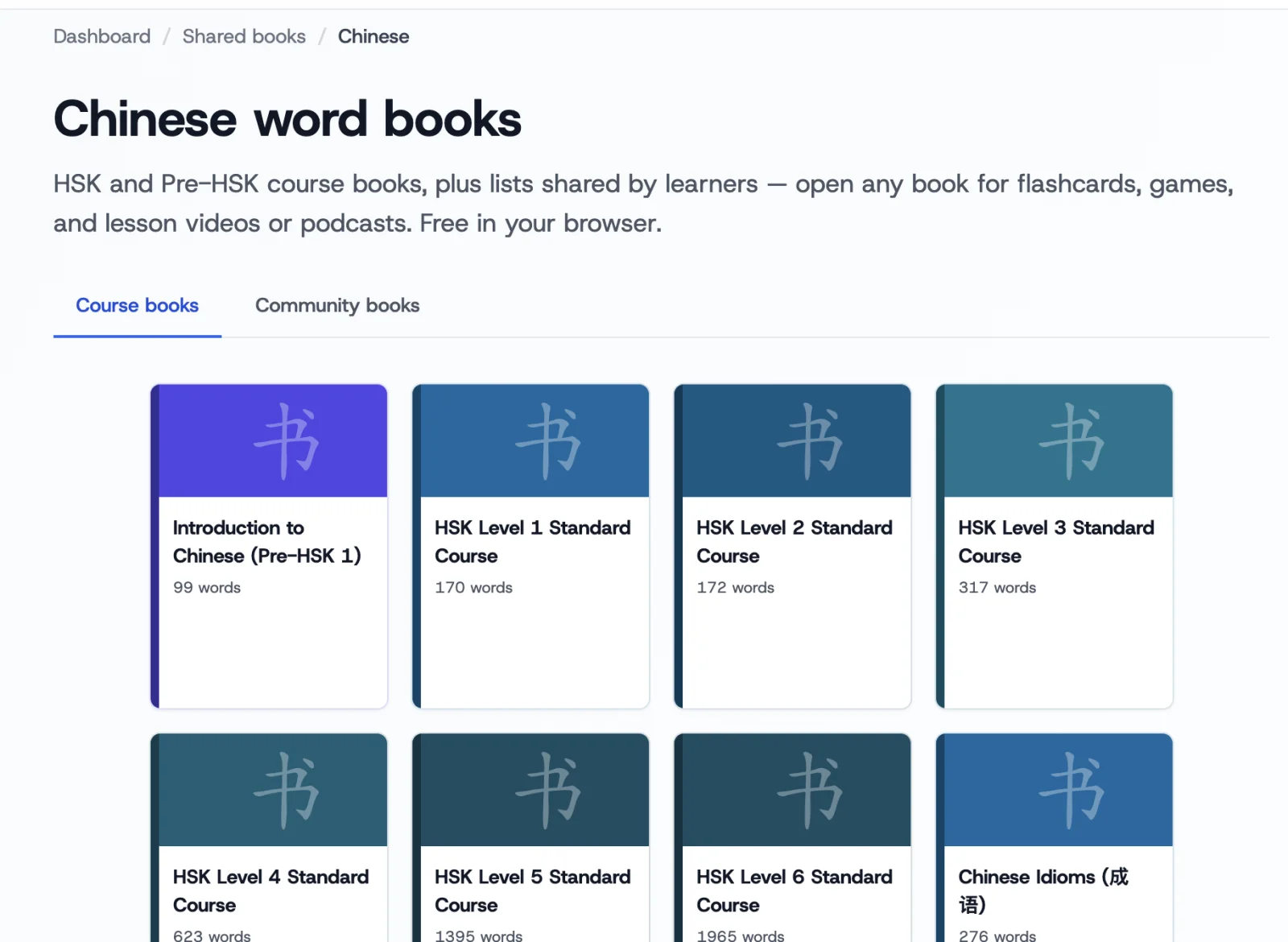
After a Chinese Zero to Hero or HSK lesson, you still need practice on that lesson's words. Shared books are public chapter pages: flashcards, scored pronunciation, and games on one word list, one link.
Try an official lesson (no account): Introduction to Chinese, Lesson 1. Full intro book.
Games built for Chinese
A shared book keeps one chapter list, and the play bar fills every game mode from those cards. Cards carry tone-marked pinyin, simplified or traditional characters, and example sentences where we have them. On a given lesson row, only games that fit the card count and sentences appear; the grid below is the full Chinese set. Each tile opens that game on Introduction to Chinese, Lesson 1 with the same deep links as the shared deck page.
Share once. Send the link. Recipients tap the game they want on your vocabulary. Signed-in study from Add to Library adds pronunciation scoring and stroke-order writing on flashcards beyond the public try page.
Easy as 1-2-3
Paste a list on a shared book (no account):
- Open any shared book page (intro book, a lesson link, or /decks/zh).
- Tap Try with your own words (on catalog books it sits under the Made with Hidden Dragon card).
- Paste words, one per line, and tap Preview games. You land on a new
/decks/... page with flashcards and games on your list. The preview link lasts about 24 hours and is not listed in the public hub; sign up later if you want to keep it.
Publish your chapter (signed in, permanent link):
- Put words in a chapter (Bulk Add, import, or your usual flow).
- Tap Share on the chapter in your library.
- Copy the
/decks/... link and send it. Anyone on the link plays flashcards and games on your list until you turn Share off.
Use an official book: open a lesson URL from the book store, or Add to Library when you want the course map and Dragon Lesson in your account.
Built to save you time
Share a chapter in about a minute
Add your vocabulary once, tap Share, copy the link. You do not build a separate activity per game.
One word list, many games
The public page turns the same chapter into flashcards plus the games above. One list powers every mode that fits the cards.
Official books and community shares
We publish HSK and Chinese Zero to Hero books as shared books. Learners and tutors Share their own chapters the same way. The book store links to Shared books & community decks for your language: open what others published, or share yours so the group uses one URL.
Try before you sign in
Official intro lessons are playable on the web without an account. Preview in the store opens the same public page before Add to Library. On any shared book page, Try with your own words pastes a list and opens games the same way.
Send a link, play on any device
Recipients open the link on phone or laptop. Playing the shared page does not require a Hidden Dragon account.
Course map in your library
Add to Library on an official book adds spaced repetition and a Course map on the dashboard: video, Dragon Lesson, and grammar steps per chapter when you study signed in.
One link instead of another deck-building tab
Chinese Zero to Hero still points learners at Quizlet and Anki for drilling. Both are fine for recognition: flip the card, check the gloss, move on.
What I wanted after each lecture was practice tied to lesson number: production, not only recognition. Tone-marked cards, pronunciation scoring, writing, example sentences, a short story from the words I had just met, and a way to say the lesson grammar out loud. I did not want to maintain a separate kit of add-ons or wonder whether "Lesson 6" in my flashcard app was the same Lesson 6 I had just watched.
A shared book page is the opposite of "export a deck, upload it somewhere else, hope the lesson still matches." The URL is the lesson. Send it to a partner, open it on your phone after class, or bookmark it for tomorrow.
Official books on the web
The book store lists curricula aligned with the official HSK exam and Chinese Zero to Hero:
- Introduction to Chinese (Pre-HSK 1), 12 lessons
- HSK 1 through HSK 6 Standard Course
- HSK 7 Standard Course (2026)
Lesson 5 in the course is chapter 5 in the book. Every book has a hub at /decks/zh/<slug> with chapter links. On the intro course, anyone can open a chapter and use flashcards and games without an account. Preview and Add to Library in the store let you read the public page first, then pull the book into your signed-in library when you want the course map and Dragon Lesson progress.
Copy link on each store row is a chapter URL for study groups or a tutor. Whole-book Share in your library works when you want one link for every chapter in a custom book.
What opens from one chapter
Open a chapter and the whole lesson hangs off it: video, study, games, sentences, story, and speaking from the same word list. Signed-in Add to Library adds writing practice, pronunciation scoring, and Dragon Lesson steps; turn on Traditional Chinese Script in Settings if you read traditional characters.
The video lives on Teachable and the clips live on Language Player. Hidden Dragon is one more tab, and I won't pretend otherwise. The chapter is the hub: it names the lesson, and each outside link opens from the right place. Lesson 1 maps to a free Pre-HSK grammar drill on 是 in Speak; you do not need an account for that scripted lesson.
Course map: pick up where you left off
When I took a few days off and came back to flashcards, the deck knew which cards were due but not which lecture they belonged to. Had I watched Lesson 6 or only skimmed the words? Had I said that grammar out loud? The course map answers that when the book is in your library.
Open the dashboard and tap Course map on the Learn card (on a narrow phone it just says Map). Each chapter expands to a short path:
- Watch lesson video: the Chinese Zero to Hero video for that chapter.
- Dragon Lesson: guided study (flashcards, writing, pronunciation, story, and games for that lesson's words).
- Speak · Grammar: the Scenarios drill for this chapter's grammar pattern, when we have one mapped.
The header shows how many steps you have finished and highlights the next open one. Introduction to Chinese Lesson 1 lists extra speaking steps on the map (scripted scene, grammar for 是, and an apply step).
Every step stays clickable in any order. The map suggests a next step when you return mid-chapter; it does not lock the rest. When you finish a grammar drill elsewhere in the app, the map counts it toward that chapter next time you open it.
Quizlet links, Anki exports
Quizlet gets the shareable part right: you publish a set and send a link. Someone opens it in the browser and runs flashcards or study modes on your words without installing an app. That pattern is real. What Hidden Dragon adds on top is Chinese-specific: tone-marked pinyin on every card, pronunciation scoring and stroke-order writing, Tatoeba-first sentences, lesson podcasts, Dragon Lesson and the course map when the book is in your library, and the games on one list tied to a chapter URL rather than a separate activity per mode.
Anki is different. It is the strongest SRS if you want full control over cards and scheduling, and you can bolt on audio or extra fields with add-ons. Sharing is not the same as a shared book: you export a .apkg, publish to AnkiWeb for download, or sync your own devices. The recipient imports into Anki. There is no public /decks/... page where a class opens one lesson link and plays games on that list with no install. For many learners that is fine. It is not the workflow this post is about.
If you already live in Anki, you do not have to choose. Open Bulk Add from the dashboard, switch to Import, and upload your .apkg or .colpkg. Hidden Dragon reads your cards and, if you leave Import SRS history on (the default), carries over scheduling from Anki. That path needs a Pro subscription. Add to Library on an official shared book does not. You can import Anki, add an official book, or Share your own chapter. They can coexist.
Links
Frequently Asked Questions
Can I play flashcards and games without an account?
Yes. Official Introduction to Chinese chapter URLs work in the browser with no sign-in. On any shared book page, Try with your own words turns a pasted list into a temporary games link (about 24 hours).
What is the difference between Preview games and Share?
Preview games is for anyone: paste words on a shared book hub, get a short-lived /decks/... link, no library needed. Share is for signed-in authors: publish a chapter from your library and get a permanent public link until you turn Share off.
Do I need Add to Library to use an official lesson link?
No for the public page. Anyone can open the lesson URL and run flashcards and games on that chapter list. Add to Library pulls the book into your account for SRS, Dragon Lesson, and the Course map.
How is this different from sharing a Quizlet set?
Quizlet gives you a link to flashcards and study modes in the browser, which is the same broad idea. Shared books add tone-marked pinyin, Chinese-specific games on one list, optional pronunciation and writing when signed in, lesson video handoff, and Pre-HSK scripted grammar in Speak for selected intro patterns.
Is Pre-HSK grammar in Speak free without signing in?
Yes for scripted intro grammar drills such as 是 (pre-hsk-shi). Open Speak from the dashboard (the grammar card on this post uses the Pre-HSK catalog). Broader HSK grammar practice in Scenarios requires Pro.
Hidden Dragon is an affiliate of Chinese Zero to Hero. Signing up through our links supports the project.
Studying for HSK?
The full official HSK curriculum, built in.
Hidden Dragon carries the complete official HSK 1 through 6 curriculum — over 9,000 cards with pronunciation practice, writing practice, and spaced repetition across every level. Free to start.
Browse HSK courses →