

Open most language apps, attempt a Mandarin sentence, and you get a single number back. 73 percent. 81 percent. Try again. The score is real but the feedback is not actionable. You do not know which syllable was off, or why, or what to fix on the next try.
Scoring is only half the problem, though. Even good feedback fades if nothing schedules it back: I wrote up why pronunciation and tones need their own review loops, not just practice sessions, separately.
The Pro pronunciation feedback in Hidden Dragon does this differently. Every syllable in a sentence gets its own score. Every wrong syllable gets a written explanation of what changed: which consonant came out wrong, which vowel slipped, which tone you produced instead of the one in the text. Some get a mouth-position diagram. Some get a sandhi rule. The architecture is two layers: Azure Speech Assessment does the acoustic scoring, and a homegrown tips engine turns that scoring into teaching.
This post walks through both layers using the same recording. The sentence is 我可以和麦克说话吗,谢谢 (May I speak to Mike, please?). The recording was real, and the score was 84 percent overall: most syllables landed clean, a couple were off, and one character broke down completely. That is exactly the kind of mid-progress moment where pronunciation feedback either teaches you something or wastes your time.
The Azure Layer: What Was Off, by How Much
Azure Speech Assessment is the most accurate consumer-grade acoustic-comparison engine we found. It listens to your audio, aligns it against the expected text syllable by syllable, and scores each syllable for accuracy, completeness, and prosody.
In Hidden Dragon, that scoring shows up two ways. First, every character in the sentence gets a percentage badge. In the screenshot below, most landed at 100. 和 dropped to 39. 说 and 话 settled in the 70s. Right away you can see which characters held together and which did not, before reading any tips at all.
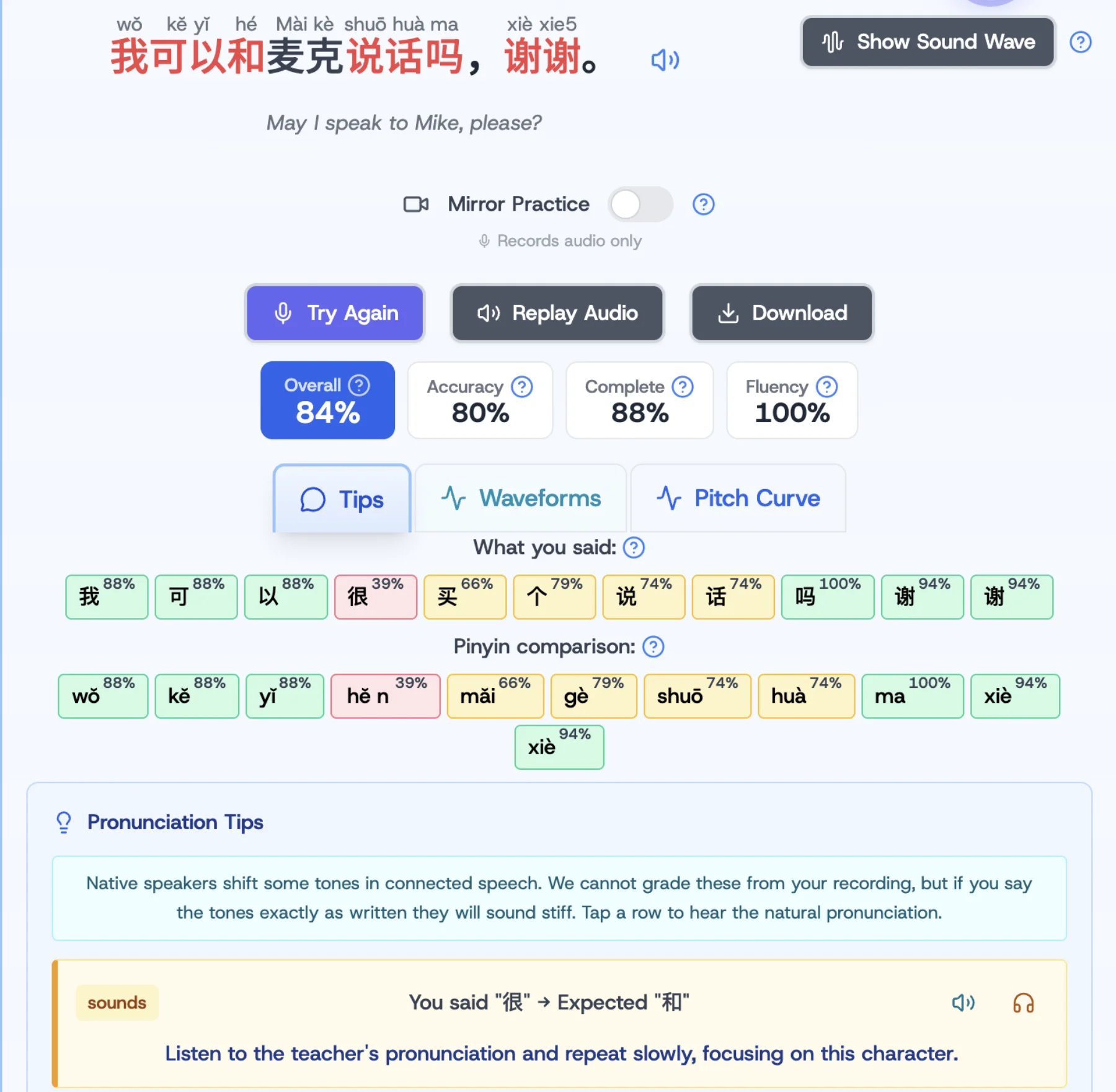
Second, the same scores reappear in pinyin form right below. Reading the pinyin row as well as the character row matters because it tells you whether the syllable came out at all, even if the character recognition was uncertain. Sometimes the script is right and the sounds are wrong. Sometimes the sounds are right and you can see exactly where they diverged.
That is what Azure does well. It is the what layer: which syllables were off, and by how much.
The Hidden Dragon Layer: Why, and What to Do About It
The same screen has a Tips tab below the scoring strip, and that is where Azure stops and Hidden Dragon takes over. Each problem syllable gets a tip, generated by our own logic from the Azure analysis output, and each tip is written for the kind of feedback a learner can act on.
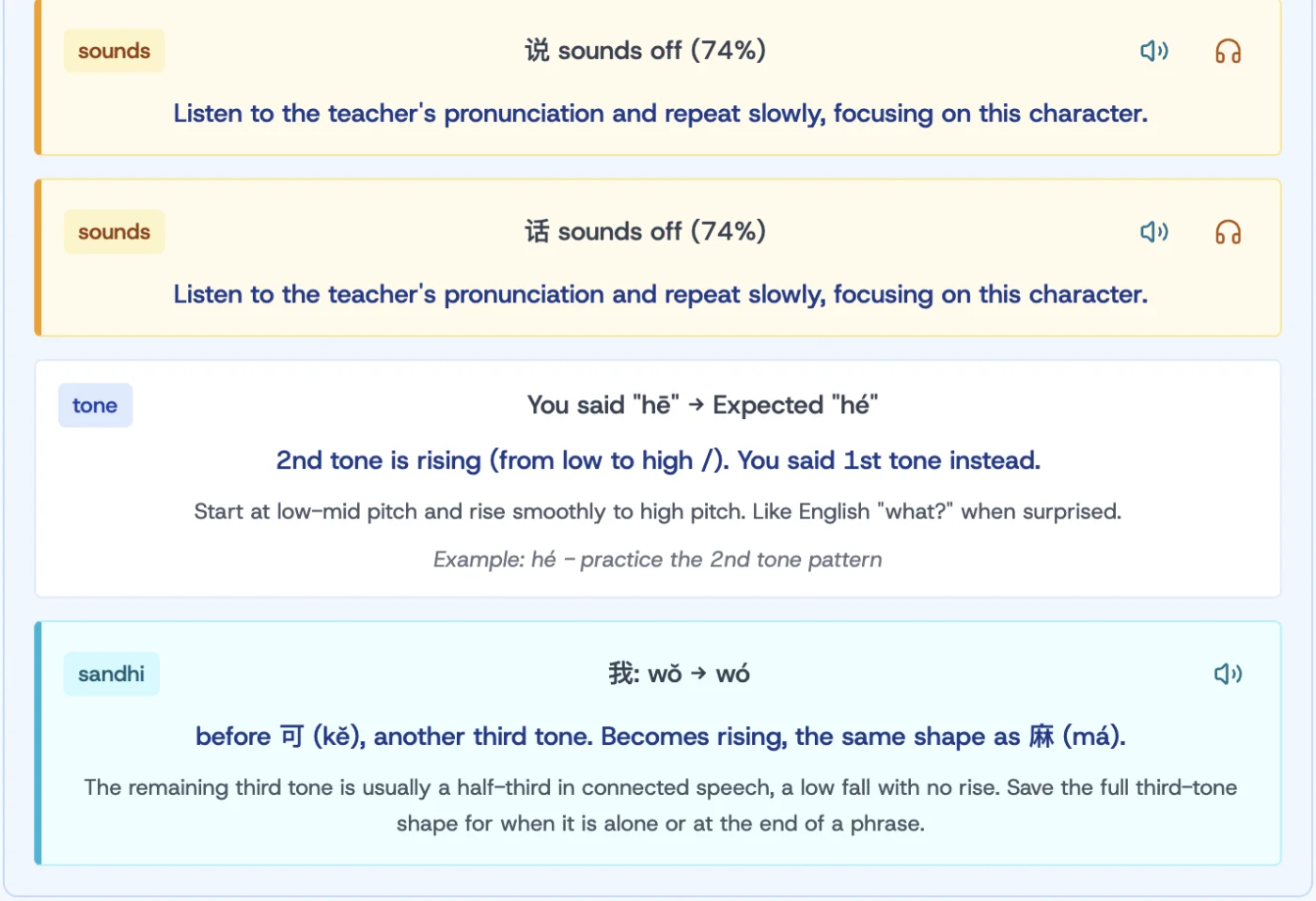
Each tip falls into one of a few categories. The category is the tag on the left.
Sounds off. When a syllable scored low overall but did not break down into a clear consonant, vowel, or tone error, the tip points the learner to the teacher's audio. "说 sounds off (74%). Listen to the teacher's pronunciation and repeat slowly, focusing on this character." This is the lightest-touch tip, used when the acoustic signal is murky enough that more specific guidance would be guessing.
Consonant or vowel difference. When you said one syllable but produced sounds closer to a different one, the tip names both the consonant and the vowel divergence. "You said jiāo, expected zhōu. Both the consonant (j vs zho) and vowel (iao vs u) are different. Focus on the consonant difference between j and zho, and the vowel difference between iao and u." Most syllable errors are consonant-or-vowel, not tone, so this category sees the most use across recordings.
Tone direction. Azure does not score Mandarin tones reliably (more on that below). Our tone analysis runs on the pitch contour and the intended tone, and tells you the geometry of what you produced. "2nd tone is rising (from low to high). You said 1st tone instead. Start at low-mid pitch and rise smoothly to high pitch. Like English 'what?' when surprised." That last touch (the English analogy) is the kind of bridge a textbook does well and an app rarely tries.
Mouth position. For consonants that learners commonly trip on (the x, q, j family in particular, or zh/ch/sh/r), a side-view anatomical diagram shows where the tongue should be. "Mouth position pinyin x" with a head outline and the tongue placement highlighted. Tap to enlarge.
Sandhi rule. This is where the system goes deeper than most learners' textbooks. Connected speech in Mandarin has tone changes that the printed text does not show. Two third tones in a row turn the first one rising. 我 in isolation is wǒ. 我可 in connected speech is wó kě, because 我's third tone becomes a rising tone before 可's third tone. Hidden Dragon detects these contexts and surfaces them: "我: wǒ → wó. Before 可 (kě), another third tone. Becomes rising, the same shape as 麻 (má). The remaining third tone is usually a half-third in connected speech, a low fall with no rise. Save the full third-tone shape for when it is alone or at the end of a phrase." This is a tip that requires understanding of both Chinese phonology rules and the specific sentence the learner is studying. It is not in Azure's output. It is in ours.
A different recording, on a different sentence, shows how dense the tip panel gets when several syllables are off at once. Sounds-off, consonant-vowel, tone direction, mouth position, and sandhi all appear on a single screen.
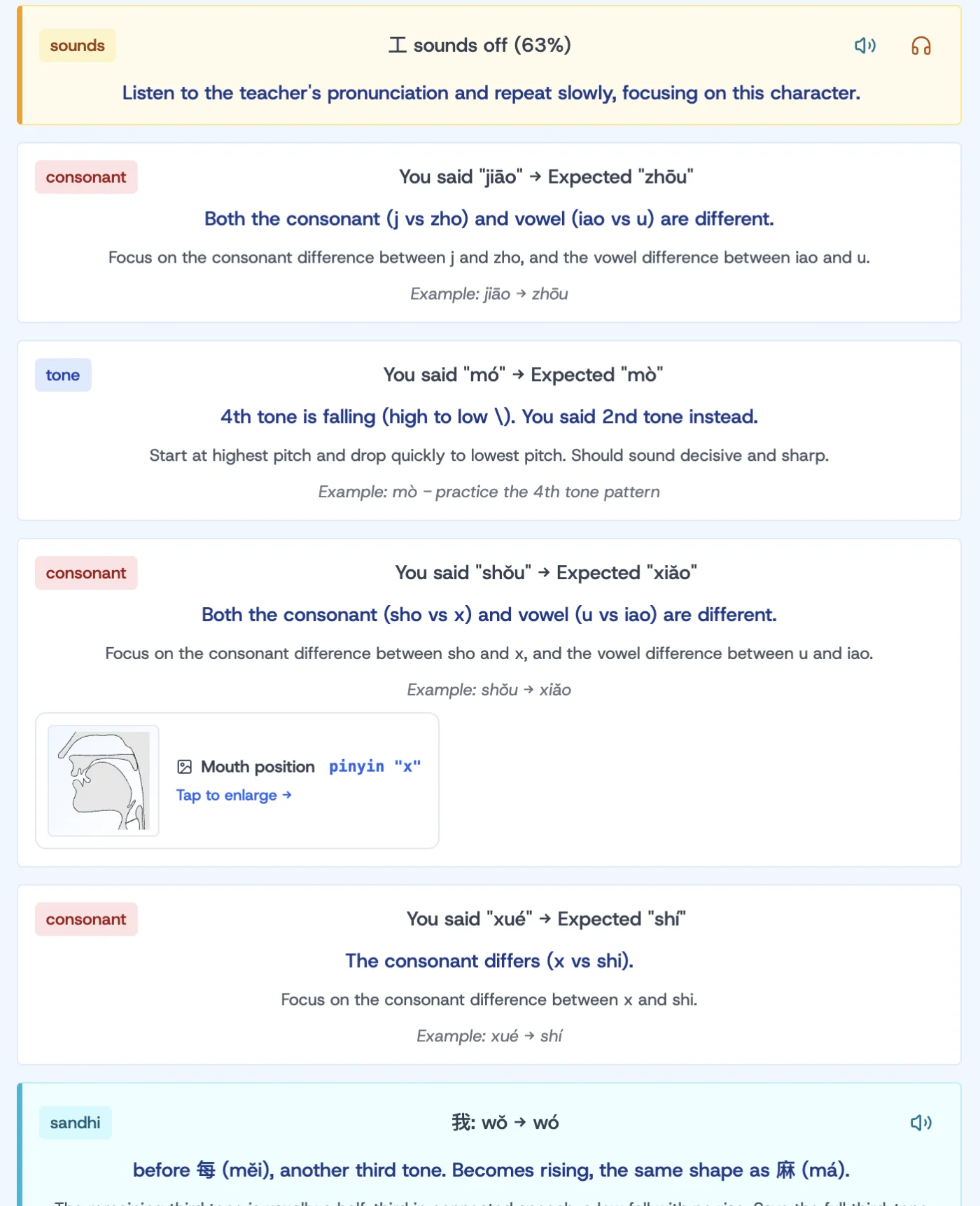
The category-based structure is deliberate. Every tip teaches one specific thing, with one specific fix, anchored to the syllable that was off. There is no "your pronunciation needs work" anywhere on the page.
Why Tones Get Their Own Treatment
Azure Speech Assessment was designed primarily for English and other European languages. In those languages, pitch carries emphasis and emotion but is not phonemic. Saying "OBject" and "obJECT" with different stress changes the meaning, but pitch contour over a single syllable does not. In Mandarin, pitch contour over a single syllable is exactly how 妈 (mā, mother) is different from 马 (mǎ, horse). The engine was not built for that, and it does not score tones reliably.
So we do not let it. Tone-related tips are generated by our own pitch analysis, not by Azure's tone score. The pitch curve tab on the same screen shows the teacher's pitch contour against your attempt, and the tone-direction tip in the Tips panel ("4th tone is falling, you said 2nd tone") comes from comparing the contour shape, not from Azure's score.
This is the only place where Azure's scoring is bypassed entirely rather than annotated. For consonants and vowels, Azure is right and Hidden Dragon adds context. For tones, Azure is wrong often enough that we do not trust its score, and the homegrown analysis is what reaches the user.
The Coverage Gap We Tell You About
There is one class of error we deliberately do not grade: tone shifts that happen in connected speech but are not explicitly marked in the pinyin. Native speakers shift some tones automatically as they connect words. The pitch curve from a recorded teacher does these shifts. Your recording, if you read the tones as written, will not. But it should not be marked wrong, because the printed pinyin does not reflect the natural pronunciation either.
The Tips panel surfaces this with a teal note at the top: "Native speakers shift some tones in connected speech. We cannot grade these from your recording, but if you say the tones exactly as written they will sound stiff. Tap a row to hear the natural pronunciation."
This is the kind of admission an algorithm-only system cannot make. Azure does not know that connected-speech sandhi cannot be inferred from text alone. We do, so we name the limit and offer a path: tap any sandhi-affected character to hear it pronounced naturally, even though we cannot score whether you matched.
What This Costs You
Per-syllable Azure scoring is a Pro feature because Azure costs money per call. The free tier still gives you pronunciation feedback through speech recognition and the pitch curve comparison: enough to tell you whether the right words came out and whether the tones went in the right direction. The syllable-level breakdown and the structured tips panel are the Pro layer.
If pronunciation is the part of Mandarin you are working on hardest right now, Pro is the right tier. If pronunciation is one of many things you do in the app, the free tier already covers the broad strokes.
Frequently Asked Questions
How accurate is the per-syllable score?
Azure's accuracy is high for non-tonal aspects (consonants, vowels, prosody). It is the same engine used in Microsoft's Reading Coach and other professional pronunciation tools. For tones, we do not rely on Azure's score and use our own pitch analysis instead.
What if I have a regional accent (Sichuan, Taiwanese, etc.)?
The default scoring is against standard Mandarin. Pro users can also select regional Dragon accents in the Scenarios game and in voice playback, but the pronunciation scoring on flashcards uses the standard reference.
Does this work for sentences as well as single words?
Yes. The screenshots in this post are from a sentence-level recording. Per-syllable scoring works on any text the app shows you, from a single character to a paragraph in a story.
What about reading a story aloud?
Story karaoke mode in Pro uses the same scoring engine, sentence by sentence, with the same tip surface.
Can I see my pitch curve?
Yes. The third tab on the pronunciation panel is Pitch Curve. Teacher's pitch in blue, your attempt in red, both overlaid on the same time axis. For deeper background on this read the pronunciation trainer post.
Is there a similar feature for English?
Yes. The same Azure layer plus our own tips works for English pronunciation training, with different tips suited to English (vowel reduction, stress patterns, syllable timing). A separate post on the English version is coming.
If the broader story of why "the AI" alone cannot teach Mandarin pronunciation is what you came for, read AI Is Broken (The Good, the Bad and the Outrageous). It covers the limits of every AI layer in a Chinese learning app, including this one. For the underlying theory of tones, read How to Learn Chinese Tones Without Going Crazy.
Hero photo by Engin Akyurt on Unsplash.